More precise user permissions
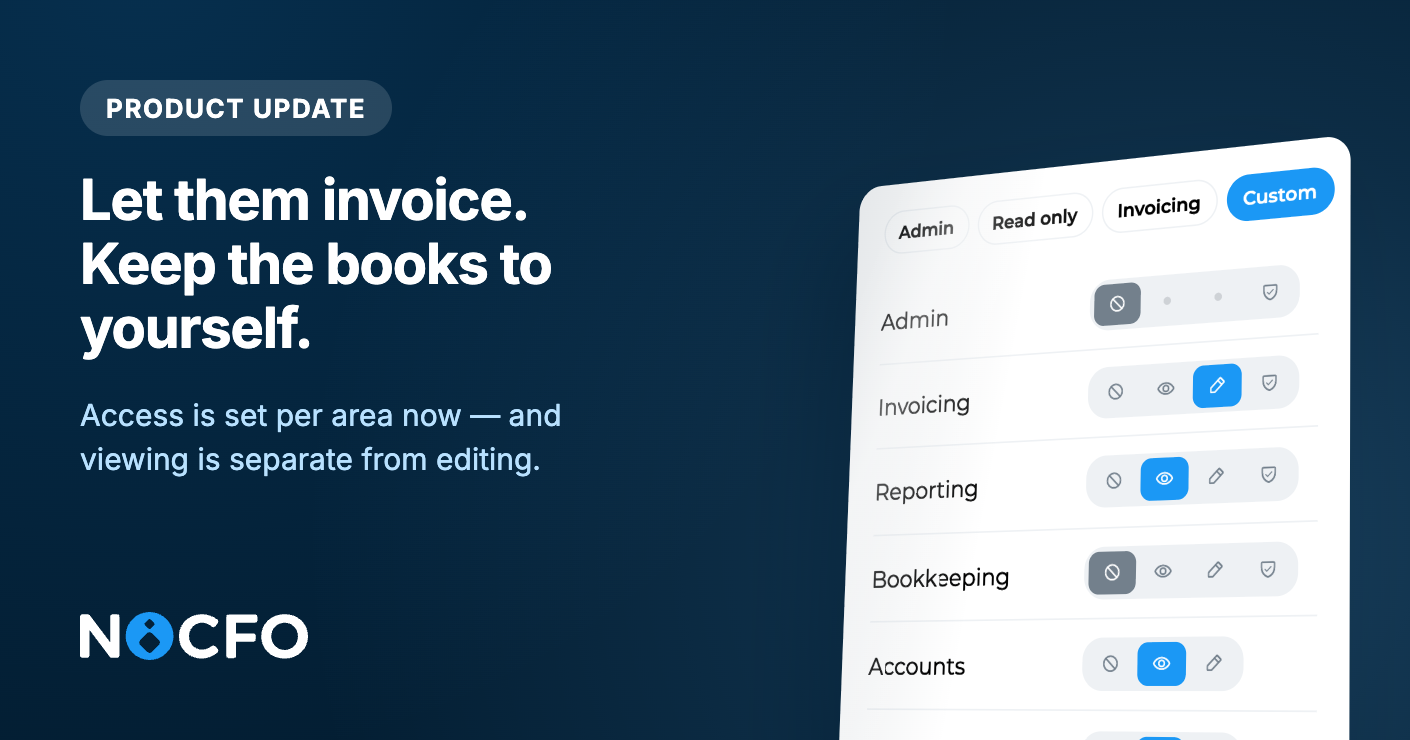
Invite people to just the parts of NoCFO they actually need. A teammate can create invoices without seeing bank transactions, reports, or the rest of the books.
Access is now set per area, and viewing is separate from editing. Here is what that looks like in practice:
Invoicing only: "Create and send invoices, but do not show bank activity or reports."
Accountant: "Handle bookkeeping and files, without invoicing admin or bank connections."
Read-only: "See documents, invoices, and reports, but change nothing."
Custom: mix it yourself. For each area you choose no access, view, or edit. Invoicing, reporting, and bookkeeping also have an admin level for settings in that area.
The areas you can control are invoicing, bookkeeping, reporting, accounts, files, and contacts. You can also grant salaries, integrations (such as connecting a bank), and adding attachments to transactions separately, without full bookkeeping edit rights.
What they cannot access stays out of the way. Menu items they do not have permission for are hidden, dashboard widgets like bank balances stay off, and they land in the first area they are allowed to use.
You manage this in one place: Settings → Users. Invite someone with a preset (Admin, Read-only, Bookkeeping, or Invoicing), or pick Custom and set each row. You can change permissions later for anyone who has already joined.